
Showing posts with label Macintosh. Show all posts
Showing posts with label Macintosh. Show all posts
Saturday, January 22, 2011
The "PaperShow Guy" is Off to MacWorld 2011

Tuesday, May 4, 2010
Adobe Announces eLearning Suite 2 & Captivate 5

SAN JOSE, Calif. - (BUSINESS WIRE) - Adobe Systems Incorporated (Nasdaq:ADBE) today announced Adobe eLearning Suite 2, a significant upgrade to its tightly integrated, end-to-end solution for easily creating, reviewing and maintaining eLearning content. The suite, now natively compatible with Mac OS in addition to Windows, enables eLearning professionals, educators and trainers to turn creative ideas into dynamic eLearning materials that engage learners with multimedia and interactivity. eLearning Suite 2 - anchored by the new Adobe Captivate 5 - includes Adobe Flash Professional CS5, Adobe Dreamweaver CS5, Adobe Photoshop CS5 Extended, Adobe Acrobat 9 Pro, Adobe Presenter 7 and Adobe Soundbooth CS5.
"Today's educational and professional learning departments are under enormous pressure to deliver impactful content quickly and efficiently," said Naresh Gupta, senior vice president, Print and Publishing at Adobe. "eLearning Suite 2 is a major leap forward in eLearning content creation. It addresses the challenge with its tightly integrated toolset that allows content creators to develop powerful media-rich eLearning experiences without the time and expense of programming."

Adobe eLearning Suite 2 enhances productivity with smarter aggregation capabilities included in Adobe Captivate 5, eLearning extensions for Dreamweaver and Flash, and new application round tripping workflows between authoring and asset creation tools. For example, a course designer can now insert Adobe Photoshop CS5 (PSD) files as smart objects into an Adobe Captivate project and update the images with one click should the original files change without having to resave and reinsert images. Similar workflows exist between the other eLearning Suite components including Adobe Captivate, Soundbooth and Flash.
"Timely, effective training on the use of our products is critical for us and our customers to meet compliance requirements," said Mary McGivern, Instructional Designer, Omnicell, a leading provider of comprehensive, technologically advanced automation that enables healthcare facilities to acquire, manage, dispense, and deliver medications and supplies more effectively. "The new user interface in Adobe Captivate 5 lets me work more efficiently and is now similar to other Adobe products. This will speed up my workflow and help me meet timelines more effectively."
Introducing Captivate 5
Adobe Captivate is the industry-leading, rapid authoring solution for developing demonstrations, application simulations and branching scenarios - without requiring programming expertise while not compromising quality. Version 5, which introduces the software to Mac OS, offers exciting new features that allow users to do more complex tasks faster such as enhanced importing and round tripping for Microsoft PowerPoint.
The new user interface - similar to the Dreamweaver CS5, Flash CS5 and Photoshop CS5 interfaces - lets users create and revise content faster and more easily than ever before by supporting multiple document editing and personalized workspaces. The Properties Inspector tool also boosts time-savings, as course authors can edit object properties in fewer steps. Additionally, eLearning professionals can leverage an expanded asset library and use customizable widgets to quickly create tables and design graphical buttons. Other major enhancements include support for rich animation effects, the ability to import videos in popular formats (AVI, MOV, FLV, MPEG) and synchronize video across multiple slides.
For more effective collaboration, Adobe Captivate 5 customers can upload, exchange and review content, as well as track and report learner scores by signing up for Adobe's online productivity software, Acrobat.com (available separately). Also, a new widget lets students and educators interact via Twitter, facilitating online Q&As and group discussion.
To ease the process of maintaining content, Adobe Captivate 5 introduces Object Style editing, which facilitates changes project-wide with just a few clicks, allowing content creators to easily define and modify the look and feel of buttons, text, images and other elements. eLearning designers can also create Master Slides with preset themes and styles for text, shapes and graphics. This accelerates authoring as contributors can focus on content rather than formatting details, and ensures that the look and feel of an organization's presentations are preserved. Once eLearning content is published, training and learning professionals can track and report key performance metrics via Acrobat.com or their own Web server.
Pricing and Availability
Adobe eLearning Suite 2 and Adobe Captivate 5 are expected to be available via Adobe Authorized Resellers and the Adobe Store at www.adobe.com/store in June. Customers can pre-order Adobe eLearning Suite 2 and Captivate 5 today. Estimated street price for the suite is US$1799; upgrade pricing starts at US$599. Estimated street price for Adobe Captivate 5 is US$799; upgrade pricing starts at US$299. Educational pricing is available for both products.
Both products are compatible with Mac OS X v10.5.7 or v10.6, Microsoft Windows XP with Service Pack 2 (Service Pack 3 recommended), Windows Vista Home Premium, Business, Ultimate, or Enterprise with Service Pack 1 or Windows 7 (certified for 32-bit Windows XP, Windows Vista and Windows 7). The Mac OS version of eLearning Suite 2 does not contain Adobe Presenter.
Helpful Links
eLearning Suite 2 and Captivate 5 Customer Quote Sheet
eLearning Workflows in eLearning Suite 2
eLearning Suite 2 home page
What's new in eLearning Suite 2 (On-demand seminar)
Top new features in Captivate 5
Captivate 5 home page
What's new in Captivate 5 (On-demand seminar)
About Adobe Systems Incorporated
Adobe revolutionizes how the world engages with ideas and information - anytime, anywhere and through any medium. For more information, visit www.adobe.com.
(c) 2010 Adobe Systems Incorporated. All rights reserved. Adobe, the Adobe logo, eLearning Suite 2, Captivate, Flash, Dreamweaver, Photoshop, Acrobat and Soundbooth are either registered trademarks or trademarks of Adobe Systems Incorporated in the United States and/or other countries. All other trademarks are the property of their respective owners.
Photos/Multimedia Gallery Available: http://www.businesswire.com/cgi-bin/mmg.cgi?eid=6275652&lang=en

Press/ Analyst Contacts
Adobe Systems Incorporated
Stefan Offermann, 408-536-4023
sofferma@adobe.com
or
A&R Edelman
Gina Pucci, 650-762-2897
gpucci@ar-edelman.com
Wednesday, February 24, 2010
Getting a Visual Overview with Wordle
 Every once in awhile I like to use Wordle to get an overview of what I have been writing about on my blog. Wordle creates a great visual poster and lets me instantly see what topics I have covered in the past couple of months. So here it is!
Saturday, February 6, 2010
Canson to Launch PaperShow for Mac at MacWorld 2010
 For the past year I have been using PaperShow extensively when I teach, do presentations, and for webinars. It has been a really indispensable tool and I carry PaperShow in my bag wherever I go. Because of PaperShow's ease of use and portability I can walk into any room and within seconds have a digital flipchart ready to go, to share and capture ideas. I have written about my experiences with PaperShow on this blog for the past year and from day one have asked Canson "when will we see PaperShow for the Mac?" Well that day is finally coming and I am happy to share with you that Canson will launch PaperShow for Mac this week at the MacWorld 2010 Conference to be held in San Francisco.
I have worked closely with Canson during this past year and I will be going to MacWorld 2010 to help them launch their new product. I have been working with PaperShow for Mac for the past couple of weeks and in some ways it is even easier to use than the Windows version. With all of the functionality of the Windows version and the ease of use of the Mac this is a real winner. So if you plan on attending MacWorld 2010, stop by the PaperShow Booth in the Exhibitor Hall-Booth 746 and say hello. I will also be doing a presentation on Friday February 12th, a Product Spotlight Session: Make Your Presentations Come to Life with PAPERSHOW for the Mac from 1:30 PM - 2:00 PM. So stop by the booth or come and learn more about PaperShow for the Mac at my presentation.
Sunday, October 4, 2009
Clickfree Transformer Cable Backup Solution
 If you have worked with computers for any length of time you know just how important the data that lives on our computers are to us. From our music, to photographs to financial data we all rely on those files being there when we boot up our computers. So the question is, "When was the last time you backed up your computer?" You see it is not a question if your hard disk will fail but a question as to when will it fail. While we go our merry way thinking that our computers will work as they should, there will come a time when you boot up and you get the dreaded error message that your computer will not start up. If a technician can't get the system up an running you will be faced with the option of having to reformat your hard drive and lose all of you files. Wouldn't it be nice if you had prepared for this event and had a backup that you could access to restore all of your data files.? I know the answer to this question, and have been working with a number of products from Clickfree to see how well they work. Clickfree has a number of products that let you easily backup your data files without the need to install any software. Clickfree tries to make the process of backing up your hard drive as fuss free as possible and in this regards- they have accomplished their goal.
I had a chance this week to take a look at Clickfree's Transformer Cable, which turns any external USB drive into a Clickfree backup solution. The Clickfree Transformer Cable is a small USB cable with the attached Transformer pod on it that you simply plug into your computers USB port. Once the Transformer is plugged into your computer you can plug in your external USB drive and within seconds the Clickfree Backup software runs finding, organizing and backing up all of your files. It is really that easy- with no software to install. With the price of external USB drives coming way down in price there is no excuse not to have your data backed up. Clickfree Transformer Cable works with Windows Vista®, Windows® XP and Mac OS X 10.5 or later.
I have to say that the Clickfree's Transformer Cable worked as advertised. I was able to back up my Dell XPS 1210 using the Clickfree's Transformer Cable in a couple of minutes and all I needed to do was plug in my external USB drive into the Clickfree's Transformer Cable. Now I have the peace of mind that my files are safe should my hard drive crash. The Clickfree's Transformer Cable backs up all of your data files and includes a Restore function should you need to restore your files. You can also search for files using the Clickfree Backup Software and access individual files should you need them. Clickfree saves your data files in the native application's file format so that it is easy to access should you need to copy or move them to another computer. The Clickfree Solution backs up over 400 difference types of files from your hard drive so that you can be rest assured that they will be there when you need them. Clickfree Transformer also ships with a small application which you can install to your computer which will remind you to backup your files- you can also set it up the Clickfree Transformer for Unattended Backups as well. You should note that the Clickfree's Transformer Cable Backup Solution does not backup your software applications or your operating system. If this is important to you, you may want to look at another solution (I hope to share this solution with you in another post shortly). But for the peace of mind of having all your data files backed up, the Clickfree's Transformer Cable solution worked as advertised. If you need a simple no fuss method to back up your computer files then this is the way to go- trust me you will be happy you did!
Thursday, September 10, 2009
Mind Mapping Updates for Snow Leopard OS X 10.6

For those of you who have upgraded to the latest Mac OS- Snow Leopard you may have encountered some difficulties running your existing applications. While the software companies are well informed about these impending changes that may impact on their software sometimes it is hard to get the patches out the door exactly when the new operating system ships. You will be happy to know that Mindjet has recently released an update for MindManager 7 which will now allow you to run MindManager for the Mac under Apple's latest operating system called Snow Leopard. You can download the update by clicking here.
Likewise, I just received word from CS Odessa that announced that all of the current versions of their ConceptDraw productivity software product line now fully supports the Apple Macintosh OS X 10.6, Snow Leopard operating system. You can find the ConceptDraw Office Update by clicking here. So if you are using ConceptDraw MindMap with Snow Leaopard just click on the link and you will be mind mapping in seconds on your Mac with the latest and greatest operating system.
Saturday, August 8, 2009
Camtasia for Macintosh to Be Released - August 25th
 I know it has been a long time coming and I am glad to announce that Techsmith will be releasing Camtasia for the Macintosh on August 25th for a special promotional price of $99 dollars until the end of the year. After that Camtasia for the Mac will be priced at $149. I know I have been waiting for this awhile now and I am sure this will become an important part of your instructional toolkit once it is released. I will be talking more about Camtasia for the Mac in future posts.
Wednesday, July 15, 2009
Vision Objects Releases MyScript for Livescribe Macintosh Version

I have blogged about my experience with the Livescribe Pulse Smartpen since its release and glad to share with you that Vision Objects has released MyScript for Macintosh. MyScript will now give Macintosh Users the ability to convert their handwriting to text for easy editing and formatting. I have used MyScript for Windows with my Livescrobe Pulse Smartpen and found it to work well, even with my handwriting (lets not go there :-).
MyScript for Livescribe is an application that converts your handwritten notes to digital text:
 | Send your handwritten notes directly from Livescribe Desktop to MyScript for Livescribe for conversion to text. |
| | Use your personal dictionary to add names, terms and abbreviations for even more accurate conversion. |
| | Convert handwriting, shapes, drawings and tables into print. |
| | Edit the resulting digital text directly in My Script for Livescribe application. |
| | Edited results can be sent to Microsoft Word or another word processor, to a text file, to your default email application or saved as a picture file. |
Tuesday, May 5, 2009
CrossLoop for Mac Released

I have been CrossLoop user for some time now and was delighted to learn today that CrossLoop for Mac is available. This easy to use tool allows any two computers to do screensharing and remotely control the other computer. The only problem prior to this announcement, was, that it only worked on the Windows platfrom. With the release of CrossLoop for the Mac you can now have sessions with your Mac as well as you Windows buddies. CrosLoop will allow you to collaboratively work on documents as well as provide you a platform for doing remote support and transfer of files. CrossLoop requires OSX 10.4 (Tiger) or later, an Intel processor, 20MB disk space and 500MB of RAM. CrossLoop will not work on a PowerPC Mac. So if you are looking for training or support check me out on CrossLoop!
Wednesday, February 18, 2009
Poll Everywhere Adds Macintosh Support for Keynote and Powerpoint
 PollEverywhere today announced that it will now support live data polling within Keynote and PowerPoint Mac.
Here’s how to download the Deskbar: when viewing your poll as either a “Live Chart” or “Live Text Wall”, click “Download Slide” and then “Keynote and PPT Mac”.
Sunday, August 10, 2008
Using the MindManager Web Launcher
 Having access to Mindjet Connect is really wonderful for some of the business projects I am working on. It is a wonderful collaboration tool and gives me access to all of my MindManager maps. For those of you who may not be familiar with Mindjet Connect it is a collaborative workspace that lets me in real time share my MindManager maps and associated files. Being able to work with one of my colleagues on some of my maps in real time is a very powerful feature. Additionally, I can also store supporting Word documents, PDF files, etc in my workspace for easy access. If you have a Mindjet Connect account and are running MindManager 7 on a Windows computer, Mindjet Connect is seamlessly integrated. This is not the case if you are a Macintosh user but here is a little trick that you should be aware of. Mindjet recently released a MindManager Web client that lets you launch your MindManager maps right from the browser. Using Firefox I am able on my MacBook to access all of my MindManager maps and associated files. Having access to the MindManager Web client lets me have access to all of my files as long as I'm connected to the web. What a great feature! I created a screencast using Jing to show you how the MindManager Web client works.
Tuesday, February 12, 2008
Web Event: PersonalBrain on My Mac
For those of you who are interested in learning about PersonalBrain for the Mac plan on attending this special webinar. I have written about the PersonalBrain and you can access my blog posts here.
http://vietnamtech.blogspot.com/2007/10/using-personallbrain-for-upcoming-web.html
http://vietnamtech.blogspot.com/2007/09/personalbrain-4-on-web.html
----------------------------------------------------------------------------------------------------------------
Web Event:
PersonalBrain on My Mac
Wednesday, February 13, 2008
PersonalBrain 4.0 is cross platform for all PC, Mac and Linux users! The software is used by hundreds of thousands of people worldwide who need to analyze, brainstorm, and synthesize a wide variety of information both on their computer and the Internet. Learn how PersonalBrain can help you link and organize all your files and Web pages on Mac OS X.
Topics Covered Include:
• Using PersonalBrain and Safari Browser to add Web pages and Thought icons
• Integrating files and folders from your desktop
• Taking notes to capture key ideas and concepts
• Moving quickly between different Thoughts with Instant Activation
• Editing and changing your Thoughts
• Working across platforms and exporting your Brain to HTML
Date
Wednesday, February 13, 2008
Time
11:00 AM Pacific, 2:00 PM Eastern
Date
Wednesday, February 13, 2008
Time
11:00 AM Pacific, 2:00 PM Eastern
http://vietnamtech.blogspot.com/2007/10/using-personallbrain-for-upcoming-web.html
http://vietnamtech.blogspot.com/2007/09/personalbrain-4-on-web.html
----------------------------------------------------------------------------------------------------------------
Web Event:
PersonalBrain on My Mac
Wednesday, February 13, 2008
PersonalBrain 4.0 is cross platform for all PC, Mac and Linux users! The software is used by hundreds of thousands of people worldwide who need to analyze, brainstorm, and synthesize a wide variety of information both on their computer and the Internet. Learn how PersonalBrain can help you link and organize all your files and Web pages on Mac OS X.
Topics Covered Include:
• Using PersonalBrain and Safari Browser to add Web pages and Thought icons
• Integrating files and folders from your desktop
• Taking notes to capture key ideas and concepts
• Moving quickly between different Thoughts with Instant Activation
• Editing and changing your Thoughts
• Working across platforms and exporting your Brain to HTML
Date
Wednesday, February 13, 2008
Time
11:00 AM Pacific, 2:00 PM Eastern
Date
Wednesday, February 13, 2008
Time
11:00 AM Pacific, 2:00 PM Eastern
Monday, January 14, 2008
MindManager 7 Mac Now Leopard Compatible
 Mindjet has announced today that they have released an update to MindManager 7 Mac that now supports Apple's latest operating system Leopard. The release now supports Quick Look which allows users to preview the mind map without having to open the file. The Service Pack is a free upgrade and is available for download at the Mindjet website.
 For those of you who will be attending the MacWorld 2008 event you can stop by Booth #S1443 and say hello to the folks at Mindjet, Inc and see the latest version of MindManager 7 Mac in action. Mindjet will be exhibiting in partnership with AEC software, the developers of Fastrack Schedule 9.2 a full featured cross platform project management software application for the Macintosh. You can check out the review of Fastrack Schedule 9.2 that I did this summer to see how it integrates with MindManager 7 Mac. Likewise, you can read my review of MindManager 7 Mac that I did earlier this year.
 If anyone is going to MacWorld 2008 please feel free to email me with your feedback about new products that you see.
Monday, November 5, 2007
XMIND 2008 Supports Leopard
 For those of you who have recently upgraded to Leopard on the Macintosh you should be aware that XMIND 2008 is Leopard Ready. XMIND is a full featured mind mapping application for both Macintosh, Windows, and Linux. XMIND 2008 is a powerful application that you will find easy to use. XMIND has an attractive and intuitive interface that should have you creating exquisite mind maps in no time. Using the Properties menu you
 can quickly structure and select from many different mind maps. You will find it easy to link note, URL's, and attachments to your ideas. XMIND 2008 also supports audio notes which adds a really nice touch for communicating your ideas. When it comes to sharing your mind maps you will find it easy to export your mind maps to Word, PDF, and Image files. Go to the XMIND 2008 website to download a trial version of XMIND 2008.
Sunday, November 4, 2007
FolderShare-Remote Access to Files

I'm sure if you are like me that you are using several computers in your home and office, and there are many times when you would like to access your files remotely. Well there are lots of commercial software products that will give you that option like GoToMyPC, but this is the year if Web 2.0 so why not look for something on the web that help accomplish this task for us.
For the past several months I have been using a program from Microsoft which runs on Windows and Macintosh called FolderShare that lets me access my files remotely wherever I am. You can go to FolderShare and download the client and install it on all of your computers that you would like to access. Once the program is installed and you have named your computers you can log into FolderShare and see your computers and your files as if you were sitting in front
 of your computer. If you see a file you want to download just click on it and the download begins. I have been using FolderShare with my Mac's and Window's computers without a hitch. It is also possible to access your Windows computer from your Macintosh and vice a versa. It is fast and works well even though it is considered beta software. You can also set up folders to synch on your computers which is a nice feature. I would have to say that considering the price of admission this is one useful software product. Give it try!
Saturday, October 27, 2007
Mac users with Disabilities Speak out
As many of you know I am a big Macintosh fan and it is really heart warming to watch individuals with disabilities use the Macintosh with the software application that were created and developed by David Niemeijer of AssistiveWare. If you have a chance take a look at the videos and listen to the podcasts to see what is possible.
Press release: Mac users with disabilities speak out
Amsterdam - 24 October 2007 - AssistiveWare today announced "Users in
Control: A Fresh Perspective on Accessibility". This new audio and
PDF podcast series offers an insightful look at how people with
disabilities are empowered through Mac OS X, while shattering
preconceptions on disability and assistive technology (AT). Here the
users of AT are in the driver's seat! Created by Mac users with
physical, speech, or vision impairments, it seeks to inform, inspire,
and provide a platform for new ideas.
More information on this podcast can be found at:
http://atpodcasts.com
You can listen to the podcast in iTunes:
http://phobos.apple.com/WebObjects/MZStore.woa/wa/viewPodcast?id=266093431
The audio version of the podcast was created using GhostReader
(http://www.convenienceware.com/ghostreader.php) with the Infovox
iVox voices (http://www.assistiveware.com/infovox_ivox.php).
Thie new audio and PDF podcast compliments the "Exploring the
Frontiers of Assistive Technology" video podcast found at
http://www.frontiersofassistivetechnology.com
This press release is also available at:
http://www.assistiveware.com/pr.php#PR241007
AssistiveWare (http://www.assistiveware.com/) is the worldwide leader
in innovative assistive technology software for Mac OS X that gives
people back their lives. This includes award-winning KeyStrokes(R)
and TouchStrokes(R) virtual keyboards, SwitchXS(R) scanning on-screen
keyboard, LayoutKitchen(R) panel editor, Proloquo(R) multi-purpose
speech solution, and VisioVoice(R), the award-winning solution for
vision impaired Mac users. The ConvenienceWare product line
(http://www.convenienceware.com) makes the advanced technologies
developed by AssistiveWare available in cool and convenient
applications that can make the life of Mac users easier.
AssistiveWare and ConvenienceWare are trade names and trademarks or
registered trademarks of Niemeijer Consult. VisioVoice, SwitchXS,
KeyStrokes, TouchStrokes, LayoutKitchen, GhostReader and Proloquo are
trademarks or registered trademarks of Niemeijer Consult. Infovox
iVox is a trademark of Acapela Group. All other trademarks are
properties of their respective owners.
--
--------------------------------------------------------------
David Niemeijer, CTO & co-CEO
AssistiveWare(R)
D.Niemeijer@assistiveware.com
http://www.assistiveware.com/
--------------------------------------------------------------
Monday, September 24, 2007
NovaMind 4 Platinum for Mac Released

NovaMind has announced the release of NovaMind 4 Platinum for Mac. NovaMind Platinum contains all the features of NovaMind Pro, plus it has resource handling, resource allocation, resource indicators, drag and drop addition of resources and resource groups from Address book, task allocation, task settings, task and resource reporting, screenwriting capabilities, and the NovaMind Presenter and various other additional features.
The NovaMind Presenter has the capability to make smooth presentations from your Mind Maps and works with either a single screen, or two screens or a screen and projector, and also works with the Apple remote. Please see the documentation for further information about the capabilities of the Presenter.
You can download NovaMind 4 Platinum by going to our downloads page: http://www.nova-mind.com/Downloads/Thursday, August 9, 2007
ConceptDraw MINDMAP 5 for Mac Shipping August 28th

It has been a really exciting time for those of us that are using mind mapping applications. I just received this email from CS Odessa Software about the upcoming release of ConceptDraw MINDMAP 5 for Mac which is slated to ship on Augsut 28th. To get a feel for MINDMAP 5 for Mac you can preview this Quicktime movie.
Check back here for a full review of MINDMAP 5 for Mac the end of August.
Odessa, Ukraine, August 9, 2007 – CS Odessa today announced the upcoming release of ConceptDraw MINDMAP 5 for Mac, scheduled for shipment August 28, 2007. ConceptDraw MINDMAP 5, an easy-to-use software tool for organizing ideas and projects, supports mind mapping, brainstorming, and personal productivity methodologies, providing businesses and individuals with an engaging and creative way to increase their efficiency and productivity. Key changes in this version include a highly intuitive interface, visually enhanced mapping, and integration with MS Office and MS Project compatible software.
Recognizing that quick and easy text outlining is essential for most tasks, ConceptDraw MINDMAP 5 provides a unique fully featured text outline view that can appear simultaneously with a map. Users can quickly switch between the map view and the outlined text description, with all changes and additions appearing real-time in both.
Visual richness and clarity is a customer priority, and ConceptDraw MINDMAP 5 now has smooth lines and text along with gradient fills and transparency settings for all map elements. Users gain an unparalleled level of control over the appearance of their mind maps. Vector drawing tools contained in ConceptDraw MINDMAP 5 enable users to draw handmade mind maps or create custom visual elements and shapes to enhance documents.
ConceptDraw MINDMAP 5 includes innovative brainstorming features that allow users to quickly add ideas to mind maps as free-floating topics, and then effortlessly rearrange them via drag and drop. A built-in session timer and newly enhanced feature set allow users to effectively manage brainstorming sessions for optimum results.
ConceptDraw MINDMAP 5 includes support for personal productivity methodologies, including “Getting Things Done” (GTD) by David Allen. Users may add, edit and track task information, priorities, and links in detailed project maps, or build a simple task and priority map to track progress.
ConceptDraw MIDNMAP 5 is compatible with all major Mac OS X project management software titles and MS Office.
Complete support of MS Project XML file format allows data transferring to and from ConceptDraw MINDMAP 5 and project management applications. MS PowerPoint export allows users to present mind maps to an audience, while MS Word export is helpful for preparing business documentation. Export features require only ConceptDraw MINDMAP 5 installed without the need of any additional software.
ConceptDraw MINDMAP 5 has a suggested retail price of $99 for Personal and $199 for Professional edition; educational, government and nonprofit pricing is available.
Monday, July 30, 2007
An Inside Look at MindManager 7 Mac

I had the opportunity to be a guest speaker for this webinar, An Inside Look at MindManager 7 Mac, and to share how I am using Mindjet MindManager in the classes that I teach at the graduate level in assistive technology. If you are not familiar with MindManager you can preview the recorded webinar and find out about all of its new features on the Macintosh which I really enjoy. You will be able to view some of the mind maps that I have created and find out how I use it when I teach. You can also download the mind maps that were used on the webinar and if you don't own Mindjet MindManager you can download a trial version form the Mindjet website. You should also know that there is a version of MindManager for Windows as well and there file compatibility. Enjoy the webinar!
Friday, July 20, 2007
FastTrack Schedule 9.2
As I use MindManager Pro 7 from Mindjet Inc., more and more, in the work that I do, I have found it to be an excellent tool to help me organize and keep information that I use in one spot. The power in the tool from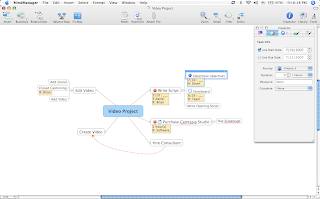 my perspective is that it allows me to quickly see my ideas and to organize them the way I see fit. Having the freedom to move my ideas around frees me up to allow my ideas to flow without the need to know exactly where the idea fits in. After looking at one of my mind maps I can always go back and change things without being concerned about the structure. As I use use MindManager Pro 7, I am always looking for new ways to extend this powerful tool for the projects that I am working on. Having said that, I have begun to use MindManager Pro 7 with project management software to help me get a different perspective on the tasks and timelines.
Mindjet Inc., has done a wonderful job of creating a product that is extensible so that other companies can develop applications that take advantage of the ideas that have been captured in MindManager Pro 7. I recently had the opportunity to preview from AEC Software, FastTrack Schedule 9.2 which is a comprehensive standalone project management software application that is cross-platform and runs on the Windows and Macintosh platform. Having just begun to use FastTrack Schedule 9.2 myself, I found it an ideal tool for someone who is just getting their feet wet in project management. The program is very visual and intuitive and provides users a quick way to jump start their project by using on of the many templates and example files that are available.
Since I am a MindManager Pro 7 user, I was really interested to see how FastTrack Schedule 9.2 could be integrated into my workflow. As MindManager Pro 7 becomes entrenched in the business and educational marketplace other publishers are looking for ways to marry the programs together. In this respect, AEC Software has really done an excellent job of being able to take data from MindManager Pro 7, and bring it into FastTrack Schedule 9.2 to do the project management. While MIndManager Pro 7 is an excellent tool for brainstorming and communicating ideas it does not have all of the tools to do project management and this is where a program like FastTrack Schedule 9.2 comes in. MindManager Pro 7 is an ideal tool for doing your brainstorming, putting your task lists together and assigning resources, however when you want to look at your project over time then you need a true project management software application. One of the really nice things about using these two applications together is that the work that you initially had done on the project can be exported from MindManager Pro 7 and brought effortlessly into FastTrack Schedule 9.2. FastTrack Schedule 9.2 can import any MindManager document and bring in all of the data that was stored within the MindManager map. If you used the Task Information pane to assign a Start Date, Due Date, Duration, Resource, and Percent Completion to a task all of this data comes over when you import your MindManager mind map into FastTrack Schedule 9.2. When I was working with my MindManager Pro 7 project file I also had included relationships among different tasks and I was glad to find out that these relationships were also carried over into FastTrack Schedule 9.2. For individuals who are just getting started with project management having the on ramp of a program like MindManager Pro 7 really can kick start your projects which can be polished off with FastTrack Schedule 9.2. Click here to view video.
One of the real strengths of FastTrack Schedule 9.2 is it ease of use and the interface. I particularly enjoyed the Gantt Chart view which allows you to see a list of your tasks and the duration in days, weeks, or hours that tasks will take. FastTrack Schedule 9.2 allows you to directly access the data and so if a you need to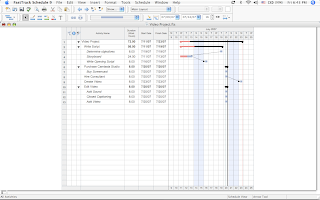 change a task duration you simply take your mouse place it on task bar and drag the task bars right border to the right to extend the task duration. You can also decide to draw task bars using the Draw bars tool, thus eliminating the need to enter Start and Duration information into a dialog box. However, FastTrack Schedule 9.2 allows you to enter task information as you see fit, so if you more comfortable using a dialog box to enter the information you can do so. The Gantt View is gives you a great overview of the project and makes for a great way to present and communicate the information. The Gantt View also allows you to look at the project to see if there are any obstacles and whether things need to be adjusted in order for the project to be delivered on time. The Gantt View also can show you milestones as well as a way to track the percent completed of each task along with the assigned resource. The Gantt View also allows you to quickly look at how your activity bars are linked and their dependencies. FastTrack Schedule 9.2 quickly lets you see the impact of making a change on one activity and watching how that ripples through your project. Linking activities is accomplished very quickly with the Draw Link tool. You simply click on the Draw Link tool and then click on the activities. FastTrack Schedule 9.2 supports four different dependency types: Finish to Start, Start to Start, Finish to Finish, and Start to Finish. You will find the FastTrack Schedule 9.2, Gantt view a great tool for communicating your projects, and if you would like you can add graphics, text and legends to the Gantt View to spruce up the document.
While having a timetable for your project is the first step in the project management cycle you will also need to get a handle on how resources are being allocated. Using the Resources view gives you a great overview of how your resources are being used and if you will need to make adjustments in the scheduling in order to accomplish your desired outcomes. The Resources View can quickly tell you if you have over allocated a resource which in that case you will need to make some decisions about hiring more people or delaying the project. All of this information is at your finger tips and a great guide as you move through the project. For those users who are new to project management FastTrack Schedule 9.2 also has a Calendar view which displays the information in a monthly calendar view which makes sharing the project information easier for those who are not accustomed to reading a Gantt chart.
When all is said and done, FastTrack Schedule 9.2 is a very easy on ramp for individuals who are just beginning to use project management software but one that can grow with them as they develop their expertise. The program is very fluid and one that allows you to jump into. FastTrack Schedule 9.2 uses standard Windows and Macintosh conventions which enables you to be up and running very quickly. When it is time to share your project there are lots of ways to do so. FastTrack Schedule 9.2 now supports the data exchange format known as iCalendar (.ics) enabling you to view project data in a calendar form. If you are using a Macintosh and have a .Mac account you can publish your Calendar view with a click of the mouse and view it on the web or if you like you can export your views in a picture format (ie. jpeg, pdf, png,) for use with PowerPoint or Keynote. You can even export the data from Fastrack Schedule 9.2 back into MindManager if you would like.
From my standpoint, FastTrack Schedule 9.2 really extends the usefulness of MindManager Pro 7 and allows me to delve into project management at level that I am comfortable with. FastTrack Schedule 9.2 is a very approachable cross platform project management software that shines in its ease of use, its presentation capabilities, and it is price point. If you are using MindManager Pro 7 and want to take the stab into project management software then take a look at FastTrack Schedule 9.2-it has a lot going for it.
 my perspective is that it allows me to quickly see my ideas and to organize them the way I see fit. Having the freedom to move my ideas around frees me up to allow my ideas to flow without the need to know exactly where the idea fits in. After looking at one of my mind maps I can always go back and change things without being concerned about the structure. As I use use MindManager Pro 7, I am always looking for new ways to extend this powerful tool for the projects that I am working on. Having said that, I have begun to use MindManager Pro 7 with project management software to help me get a different perspective on the tasks and timelines.
Mindjet Inc., has done a wonderful job of creating a product that is extensible so that other companies can develop applications that take advantage of the ideas that have been captured in MindManager Pro 7. I recently had the opportunity to preview from AEC Software, FastTrack Schedule 9.2 which is a comprehensive standalone project management software application that is cross-platform and runs on the Windows and Macintosh platform. Having just begun to use FastTrack Schedule 9.2 myself, I found it an ideal tool for someone who is just getting their feet wet in project management. The program is very visual and intuitive and provides users a quick way to jump start their project by using on of the many templates and example files that are available.
Since I am a MindManager Pro 7 user, I was really interested to see how FastTrack Schedule 9.2 could be integrated into my workflow. As MindManager Pro 7 becomes entrenched in the business and educational marketplace other publishers are looking for ways to marry the programs together. In this respect, AEC Software has really done an excellent job of being able to take data from MindManager Pro 7, and bring it into FastTrack Schedule 9.2 to do the project management. While MIndManager Pro 7 is an excellent tool for brainstorming and communicating ideas it does not have all of the tools to do project management and this is where a program like FastTrack Schedule 9.2 comes in. MindManager Pro 7 is an ideal tool for doing your brainstorming, putting your task lists together and assigning resources, however when you want to look at your project over time then you need a true project management software application. One of the really nice things about using these two applications together is that the work that you initially had done on the project can be exported from MindManager Pro 7 and brought effortlessly into FastTrack Schedule 9.2. FastTrack Schedule 9.2 can import any MindManager document and bring in all of the data that was stored within the MindManager map. If you used the Task Information pane to assign a Start Date, Due Date, Duration, Resource, and Percent Completion to a task all of this data comes over when you import your MindManager mind map into FastTrack Schedule 9.2. When I was working with my MindManager Pro 7 project file I also had included relationships among different tasks and I was glad to find out that these relationships were also carried over into FastTrack Schedule 9.2. For individuals who are just getting started with project management having the on ramp of a program like MindManager Pro 7 really can kick start your projects which can be polished off with FastTrack Schedule 9.2. Click here to view video.
One of the real strengths of FastTrack Schedule 9.2 is it ease of use and the interface. I particularly enjoyed the Gantt Chart view which allows you to see a list of your tasks and the duration in days, weeks, or hours that tasks will take. FastTrack Schedule 9.2 allows you to directly access the data and so if a you need to
 change a task duration you simply take your mouse place it on task bar and drag the task bars right border to the right to extend the task duration. You can also decide to draw task bars using the Draw bars tool, thus eliminating the need to enter Start and Duration information into a dialog box. However, FastTrack Schedule 9.2 allows you to enter task information as you see fit, so if you more comfortable using a dialog box to enter the information you can do so. The Gantt View is gives you a great overview of the project and makes for a great way to present and communicate the information. The Gantt View also allows you to look at the project to see if there are any obstacles and whether things need to be adjusted in order for the project to be delivered on time. The Gantt View also can show you milestones as well as a way to track the percent completed of each task along with the assigned resource. The Gantt View also allows you to quickly look at how your activity bars are linked and their dependencies. FastTrack Schedule 9.2 quickly lets you see the impact of making a change on one activity and watching how that ripples through your project. Linking activities is accomplished very quickly with the Draw Link tool. You simply click on the Draw Link tool and then click on the activities. FastTrack Schedule 9.2 supports four different dependency types: Finish to Start, Start to Start, Finish to Finish, and Start to Finish. You will find the FastTrack Schedule 9.2, Gantt view a great tool for communicating your projects, and if you would like you can add graphics, text and legends to the Gantt View to spruce up the document.
While having a timetable for your project is the first step in the project management cycle you will also need to get a handle on how resources are being allocated. Using the Resources view gives you a great overview of how your resources are being used and if you will need to make adjustments in the scheduling in order to accomplish your desired outcomes. The Resources View can quickly tell you if you have over allocated a resource which in that case you will need to make some decisions about hiring more people or delaying the project. All of this
 information is at your finger tips and a great guide as you move through the project. For those users who are new to project management FastTrack Schedule 9.2 also has a Calendar view which displays the information in a monthly calendar view which makes sharing the project information easier for those who are not accustomed to reading a Gantt chart.
When all is said and done, FastTrack Schedule 9.2 is a very easy on ramp for individuals who are just beginning to use project management software but one that can grow with them as they develop their expertise. The program is very fluid and one that allows you to jump into. FastTrack Schedule 9.2 uses standard Windows and Macintosh conventions which enables you to be up and running very quickly. When it is time to share your project there are lots of ways to do so. FastTrack Schedule 9.2 now supports the data exchange format known as iCalendar (.ics) enabling you to view project data in a calendar form. If you are using a Macintosh and have a .Mac account you can publish your Calendar view with a click of the mouse and view it on the web or if you like you can export your views in a picture format (ie. jpeg, pdf, png,) for use with PowerPoint or Keynote. You can even export the data from Fastrack Schedule 9.2 back into MindManager if you would like.
From my standpoint, FastTrack Schedule 9.2 really extends the usefulness of MindManager Pro 7 and allows me to delve into project management at level that I am comfortable with. FastTrack Schedule 9.2 is a very approachable cross platform project management software that shines in its ease of use, its presentation capabilities, and it is price point. If you are using MindManager Pro 7 and want to take the stab into project management software then take a look at FastTrack Schedule 9.2-it has a lot going for it.
Subscribe to:
Posts (Atom)