Blog on the topic of assistive technology, eLearning, mind mapping, project management, visual learning, collaborative tools, and educational technology
- Export to Mindjet Player
- FastTrack Schedule 9.2
- Flash video
- Flipnotebook
- Fly_Fusion
- Fly_Pentop
- Forms
- Gantt
- Gantt Charts
- Gideon King
- Ginger Software
- Glance
- Google Apps
- Google Presentation
- IBM
- MindView 3 BE
- Mindjet Connect
- elearning
- eye-fi
- file storage
- friedlander
- handwriting recognition
- hovercam T3
- inspiredata_1.5 videos
Thursday, September 8, 2011
New Releases: Mindomo 6 & MindMapper 12
SimTech this week also announced the release of MindMapper 12 a full featured desktop mind mapping application for Windows. MindMapper 12 now sports the Fluid Interface Ribbon common in many Windows applications making it easier to use. MindMapper 12 now enjoys many more user panes to make the program easier to navigate and use. MindMapper 12 offers users some very sophisticated mapping structures to accomplish brainstorming, project management, presentation of ideas, as well as root cause analysis. MindMapper112 incorporates project management features as well as Gantt Charts for those professionals who need to track ongoing projects. Once I have a chance to sit down with MindMapper 12, I will share with you some of my thoughts.
It is exciting to be able to cover this arena and to see all of the choices we have in the tools that we use for our business and professional work. Stay tuned for more thoughts about these applications. In the meantime- if you have a chance go to SimTech's and Mindomo's Website and trial each of the applications and let me know how you make out.
Tuesday, April 26, 2011
Printing my iThoughtsHD Mind Maps with the HP ePrint Technology
Wednesday, March 23, 2011
CS Odessa Announces that ConceptDraw PROJECT v6 Import & Exports to Microsoft Project
Phone: (408) 441-1150
oreams@csodessa.com
ConceptDraw PROJECT gains ability to exchange data with MS Project
San Jose, California (PRWEB) 23, March 2011 - CS Odessa today announced that ConceptDraw PROJECT v6 now has the ability to import and export Microsoft Project XML files, with new PROJECT EXCHANGE. Because of this ability to exchange data between ConceptDraw PROJECT and MS Project; users have increased flexibility on how to exchange project information with all members of the project team. The exchange of project data across different project applications keeps everyone informed and allows for quality collaboration among team members, as well as 3rd parties that have involvement in your project.
The ability to exchange project information is key to a project’s success. ConceptDraw PROJECT 6 has the ability to save to a MS Project XML file format so that ConceptDraw PROJECT files can be shared with users of MS Project (2003, 2007, and 2010) as well as any other project management tools that can accurately import MS Project xml file format. This allows users of ConceptDraw PROJECT 6 and ConceptDraw Office 2 (contains ConceptDraw PROJECT 6) to generate project content that can be shared with all team members.
Project participants also have the ability to import MS Project files into ConceptDraw PROJECT 6 and ConceptDraw Office 2. This gives users an excellent alternative on the way they manage projects, and assists in the interoperability of project information between team members who have Macintosh and PC computers.
The ability to exchange data between ConceptDraw Office and MS Project is a big plus for project members because they can then use the other the other project tools that are part of ConceptDraw Office. As an example, ConceptDraw MINDMAP 7, part of ConceptDraw Office 2, can be used as a project front- end to brainstorm, build processes, identify contingencies and organize information for presentations to brief team members and stakeholders. The PROJECT EXCHANGE can be found in the CS Odessa ConceptDraw Solution Park.
CS Odessa provides a range of professional project software tools that assist you during every stage of your project. ConceptDraw Office uses powerful ConceptDraw INGYRE2 technology to make all tasks as easy as pushing a few buttons. The top to bottom integration of ConceptDraw Office, which includes the innovative standalone ConceptDraw PROJECT 6 product, are valuable tools to help Project Managers work towards their organization’s success.
In addition, CS Odessa also provides many project management solution add-ins that can be downloaded from ConceptDraw Solution Park. The combination of ConceptDraw Product and ConceptDraw Solution Park, from CS Odessa makes for an unbeatable value in project management software tools.
For more information, visit www.conceptdraw.com.
# # #
Wednesday, March 9, 2011
MindView 4 Adds Audio Sound Recording
Friday, November 12, 2010
Matchware Announces Mindview 4
Friday, October 2, 2009
Microsoft Adds a Timeline View to MS Project 2010
of the project. It would seem that if you are not a professional project manager that reading Gantt Charts could pose a problem. There is a great deal of clarity that can be derived from looking at a Timeline and the information is much more digestible. In the original post I talked about how MindView 3 Business Edition from Matchware enables you to communicate the information in either a Gantt Chart, a Timeline or a Combination Timeline/Gantt Chart View. So depending on your audience you can decide how to share the information visually, that is best suited for your stakeholders.In light of my July post it was interesting for me to come across the blog post from the Microsoft Project Team Blog that announced that they had added a Timeline View to MS Project 2010. From the post it looks as if there will be lots of ways to customize and format the Timeline. The post also noted that you will be able to copy and past the Timeline information into the other
Office Products. It is my understanding that the Timeline will come in as Office Art shapes that will then allow you to format it to your hearts content. So I would like to believe that my post swayed the large Seattle company called Microsoft to add the Timeline view- but who am I kidding! In any case it is great to see that tools like MS Project 2010 will give users a flexible tool for communicating project information and status.
Monday, August 3, 2009
Presenting Your Proposal as a Mind Map
As I am gearing up for the fall consulting season, I am often asked to provide various schools and business organizations with proposals to give them a sense of how I can help them reach their goals. During the course of the year, I am providing a great deal of professional development and training professional staff on many different educational software titles and computer technologies. For the past year or so I have decided to practice what I preach and have been presenting my proposals visually in a mind map. As a result of this decision, I have found that it takes me half the amount of time to put together the proposal in a mind map but more importantly, the presentation to my clients adds a degree of clarity and conciseness which they all favorably comment on. Many of my clients are unaware of this modality and often comment what a great way to present the information without the need to plow through pages and pages of text.One simple mind map convey volumes and is easily digested getting to the crux of the matter. Of course if you must, you can always export your map to Microsoft Word and present them with a traditional proposal. I recently created a proposal in MindManager 8 and then exported it as a Mindjet Player which I emailed to my client. For me having the Export as a Mindjet Player feature is the real killer feature in MindManager 8. Being able to open the Mindjet Player file with the free Adobe Acrobat 9 Reader makes it easy to share my mind maps. After emailing my client the mind map it wasn't before too long that I received an email back commenting how wonderful the proposal presentation was. For me it was a win-win situation all around! My proposals take me less time to prepare and my clients find the presentation easy to read and digest. So if you have the opportunity to prepare a proposal think about the prospect of delivering it as a mind map- you will be glad you did!
In my efforts to bring you articles that interest you I would appreciate it if you could complete this short survey.
Tuesday, July 28, 2009
Embedding your WebBrain in Your Blog

I recently posted about how you can post your PersonalBrain 5 to the web with WebBrain with a click of the mouse. Well pretty close to it. One of the really exciting features of the WebBrain is being able to have access to your links and attachments as if you were working with the PersonalBrain 5 on your desktop. Think of all the possibilities! This is a very powerful feature and one that I will certainly use when I am planning my workshops. Think about giving your attendees a simple URL to your WebBrian that they can access that would allow them to jump to web sites and have access to your attached handouts. That is really an outstanding feature.
WebBrain is evolving as we speak and I just learned that you can now embed your WebBrain in a blog or website by simply clicking on the Share button
and copying the embedding code from the Webbrain site. If you click on the Customize option you can change the dimensions to suit your need. I should mention that you can also upload your PersonalBrain 5 files and keep them private so that only you can access them over the web. Likewise you can determine which Thoughts to keep private so that they don't appear when you upload them to WebBrain by marking them as Private thoughts in the PersonalBrain 5. If you have any questions or ideas on how you would use WebBrain - please leave me some comments.Friday, July 10, 2009
Google Voice-Trying it Out
I have been hearing a lot about Google Voice for the past couple of months and a just today I received an email that I could sign up for a Google Phone Number. I quickly validated my account and set up a Google Voice Gadget that now appears on my blog. I am hoping that some of you might be interested in asking me a question or just drop me a line and say, hello.
Google Voice is a free service, should you decide to give me a call within the United States. You can call me and leave me a message by clicking on the Google Voice gadget and entering the following number: (908) 955-3450. For the time being, I have directed all of my phone calls to the web where Google will transcribe my message for me-that I can access and listen to. Google Voice will also allow me to forward calls to my office or mobile phone, which at this time I have decided not to do. So feel free to give me a call and I will let you know how it goes!
Friday, July 3, 2009
MindGenius 2.5: An Overview
I had the opportunity several weeks ago to speak with Dustin Newport, Director of Business & Marketing for MindGenius about their flagship product MindGenius 2.5. I always find it interesting to learn just how these applications come about and their genesis. Dustin shared with me that MindGenius came about as the result of the work of the parent company Gael Quality Group, which is a large consulting company in the compliance and quality management field. In March 2008, MindGenius Ltd, spun out of the parent company into new quarters with a new vision of where they could take this exciting mindmapping application. For the past month I have been using MindGenius and find it to be a powerful, nimble, and straightforward mindmapping application that runs on Windows platform.When you first start off using MindGenius you can select from a number of redesigned templates to start your mind map session. One of the features which is unique to MindGenius is the ability to use the Question Assistance when developing your mind map. With the Question Assistance turned on you will see a array of topics with questions to help jump start your creative thinking process. There are a number of different topics and associated questions for each of the topics in MindGenius. Once your select your template you are ready to start your brainstroming or planning session using MindGenius. MindGeniis sticks to the core of mind mapping application letting you quickly get your ideas out on the computer screen. As a user you simply start typing and a new entry box pops up to enter your idea. If you like you can format the entry within the dialog box and press enter to add an idea to your mind map. I found the means to enter and idea fast and fluid. To add a series of subtopics all you need to do is select the topic and start typing. MindGenius comes with a library of map markers that you can add to your mind map that can
act as a means to create a new map based on the category of the marker. I found this to be a fast and efficient way to look at tasks in my mind map that are assigned to a particular category. Likewise, you can assign a resource to each topic or subtopic in MindGenius and then with a click of the mouse create a new map with all of the tasks sorted by Resource. When working on larger projects this is an invaluable tool to get the big perspective on who is responsible for each of the tasks in the project. MindGenuis does not have the capabilities at this time to visually display what percent of the task is complete. Another unique feature of MindGenius is the Map Explorer which is displayed on the left hand side in a pane that lets you quickly move about your map within an outline mode. As soon as you select a topic in the Map Explorer the topic comes into focus with all the associated subtopics. Having a Map Explorer makes it very easy to move through large maps and can be used to move through your maps when you want to use it for presentations. By simply using the down arrow keys you can move through your MindGenius
map via the Map Explorer so that the focus is always on the specific topic or branch. Pairing up MindGenius with a data projector to present the information is a great way to communicate and share your ideas.MindGenius is fairly typical of mind mapping applications and allows you to link to web sites, files, PDF's. I personally would prefer to be able to embed certain files in my mind maps or at least give me the option to choose between embedding or linking. MindGenius allows you to set boundaries as well as adding floating and call out text. You can also display relationships between ideas on your mind maps buy using the insert Relationship option. Likewise, it is easy to add a note to a topic or subtopic by typing into the Notes pane. If you choose you can also add a watermark to the background when printing your maps. When it is time to distribute your MindGenius maps you can use the free viewer or distribute it as an executable(.exe) file. You can also decide to export your map as HTML and upload it to your server so that others can view it on te web. Or better ye,t export it to the ubiquitous PDF format so that you can email it to your colleagues who can open it with the free Adobe Acrobat Reader.
MindGenius offers seamless integration of your mind maps into the Microsoft Office Suite of products. If you are interested in using MindGenius as part of your project management solution you will find outputting your mind map to Microsoft Project a snap. I found it very easy to move my MindGenius map right into Microsoft Project with all of the data completely intact. Once you start the export process to Microsoft Project you have an array of options as to what you would like to move over to Microsoft Project. You can click on this link to view an overview of MindGenius. You also have the option to export your maps to Word, PowerPoint, Outlook, and Visio.
MindGenius is an easy to use mind mapping application that you should be up and running in no time. MindGenius is a straightforward mind mapping application with some unique features that should make it a valuable tool in your arsenal for brainstorming, project planning, and business consulting. The Map Explorer feature along with the Questioning Assistance Pane add some unique functionality to this well thougth out application. My favorite feature which should be ideal for anyone using this tool for project planning is the ability to create a new map based on the resources or categories attached to a topic or subtopic. Overall you will find MindGenius an easy to use mind mapping application with a small footprint. I would hope that MindGenius will continue to build on their fine product and modernize the interface and refresh the graphics and the overall look of the program.
Click on this link to view an overview of MindGenius 2.5
Friday, June 26, 2009
Interview with Phil Novack of Mindjet

I recently had the opportunity to interview Phil Novak, Manager of Global Communications at Mindjet and ask him some question about the recent release of Mindjet MindManager 8 CPA Edition.
Brian S. Friedlander: I noticed that Mindjet just released MindManager 8 CPA edition- I was wondering if you could tell me more about this edition and how it differs from the standard version of MindManager 8?
Phil Novack: The MindManager CPA Edition is a purpose-built tool that enables CPA's to synthesize information and communicate it all in a way that business understands. The MindManager software is not changed; however, the CPA Edition includes with MindManager twenty-four custom-built templates that were developed by CPA's for
CPAs.
Brian S. Friedlander: Can you share with us how this edition came to be? And how will CPA’s will benefit from using MindManager 8 CPA edition?
Phil Novack: The edition came to be as a result of Mindjet’s relationship with Tom Hood from the Maryland Association of Certified Public Accountants (MACPA). CPA's are trusted advisors for clients and peers, and today the business and accounting worlds are changing at unprecedented rates. MindManager CPA Edition is focused on providing CPA's the following benefits:
- Improve organization
Organize and find information you need quickly and efficiently in a map. By adding and updating information, documents, and hyperlinks in the map, you can count on having the most current information at your fingertips.
- Track processes
Manage the evolving accounting landscape and cope with increasing complexity and ongoing standard changes. Track and understand your unique processes within a living document and allows you to understand all the moving parts.
- Communicate more effectively
See the forest without losing site of the trees. Detailed maps of your processes provide context that drives team
and stakeholder alignment. Communicate with engaging visual illustrations that speak to business in the language it understands.
What are some of the templates that are included in this version?
· Audit Plan
· Audit Checklist
· Internal Audit Checklist
· Due Diligence
· Organization Chart
· XBRL Implementation
· Board Meeting
· And more…
Brian S. Friedlander: Can we expect to see other editions of MindManager 8 that are geared to a specific profession or industry?
Phil Novack: Mindjet sees great potential in providing solutions for our customers that focus on the specific business value for their role or industry. While we can’t comment specifically on any future products, we recognize the tremendous value solutions like these provide for our customers and are always working to serve them better.
For more information about MindManager CPA Edition Click here.
Wednesday, June 10, 2009
Article about the Power of Mindmapping
There was quite a buzz this week about the article posted on the Forbes.com website about the Power of MindMapping. The author Dan Woods talks about the difference between a linear and nonlinear approach to presenting information and the impact it makes in sharing information.From my perspective, there is an energy that is shared when presenting information in a mind map that is not often felt when producing it in a text based outline. For me, mind maps help to clarify and give you a clear snapshot of the task or project at hand. With this clarity, I am able to better plan and initiate my projects-but more importantly it is a great way to visually communicate and share ideas with others in refreshing manner. Many of my clients often comment that they really enjoy my presentation of the information that is conveyed and that it is more digestible, then seeing it in a report or in an outline form. But just in case, I always have my outline as a backup for those clients who may not be inclined to seeing the information in a mind map. If you haven't tried mindmapping I urge to experience it and see what it is about. I have a number of resources on my blog to help you gt started and if you need some help, please free to email me.
Sunday, May 17, 2009
Nominate XMind for Best OpenSource Application
My colleague Stephen Zhu from XMind wanted to let you know that XMind has been nominated by SourceForge as one of the best Open Source Projects. If you enjoy using XMind then here is your opportunity to nominate it for the best Open Source project. You can vote for XMind at the following address. Please vote for XMind at- sourceforge.netGood luck to XMind!
Sunday, December 28, 2008
Context Organizer for MindManager
I was first attracted to Context Organizer because of the fact that it is an add-in to MindManager 7 & 8. Using Context Organizer you are able to quickly get the context of attached documents as well as web sites right within MindManager 8, that are visually displayed as topics and subtopics. In the screen shot to the left you can see that I have a PDF document attached to the topic, Inclusion Times Issue.With Context Organizer running it automatically created the rest of the topics and subtopics to the left of the topic Inclusion Times Issue, by looking at the content of the PDF file that was attached. You can see that it pulled out the 3 top keywords as well as the Summary which gives me a great idea of what I would find if I were to open the PDF file and readthe entire document.
Context Organizer will also will give you more extensive summaries of the PDF that are included within the the MindManager 8 map as you can see from the screenshot to the right. Context Organizer is very easy to use and when you Right click on a topic the Context Organizer menu options are displayed along with any Options that you would like to set. Context Organizer can also be
used for determining keywords from websites that are connected to your visual maps from within MindManager 7 & 8. If you are a MindManager 7 or 8 user and are looking for a tool to help you wade through piles and piles of documents and or websites than you should definitely take a look at Context Organizer for MindManager. Context Organizer works with MindManager 7 as well as 8 and is a very handy tool to help you find the context of the documents as well as websites right within MindManager. There is a free trial available at the Context Discovery website. So give it a try and post your comments here.
Tuesday, December 23, 2008
MindMeister 3.1 Released
XMind -- An Open Source Brainstorming and Mind Mapping Software!

XMind, a leader in mind mapping, visual thinking and collaboration software, helps you to think and create, and to collect and organize information with great flexibility.
Even more, you can also easily share your mind maps online with any people. As an Open Source software application , XMind also brings Web 2.0 concepts and community online sharing.
XMind will enable you to:
* Easily capture your ideas from brainstorming sessions
* Easily organize information for meetings and presentations with a wide range of formats
* Share your ideas and broadcast your knowledge to the world
Thursday, December 18, 2008
MindManager 8 Web Services Video Up
Each month for the past year I have produced a video tutorial or tip for Mindjet Connections Newsletter and I am happy to report this month's video is up on the topic of Web Services, a new feature found in MindManager 8. MindManager 8 Web Services offers users some very powerful search features that can be accessed right within the MindManager8 without having to leave the application. In the video I demonstrate how you can use both the Amazon and Google Web Services right within MindManager 8. I hope you enjoy the video tutorial.
Wednesday, December 10, 2008
RobiNZ MindManager 8 for Kiva Auction
Tuesday, November 25, 2008
PollDaddy and MindManager 8
You probably know by now, that I like tinkering with new Web 2.0 services and decided to give PollDaddy a try. PollDaddy lets you create a free account and create polls and surveys free of charge. There are some limitations with the free account- but I decided to give it a try and see what happens. So if you can indulge me and fill out I the poll I created I would appreciate it.On the heals of the release of MindManager 8 I thought it might be interesting to see what new features are most valuable to you and how you are using MindManager to accomplish your work and personal goals. I have also included some questions about your interest in training and what add-ins you are currently using with MindManager. So if you can take the time to complete it I will summarize the data and report back here with the results. Click here to go to the poll. Thanks- Brian
Wednesday, November 12, 2008
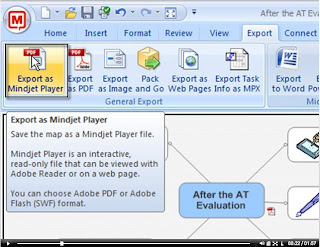
Mindjet Player Screencast
I am really jazzed up about the Export to Mindjet Player feature found in MindManager 8 because it opens up all kinds of possibilities for teaching and training. In the this screencast I demonstrate just how easy it is to share your maps using MindManager 8. You can click on the screenshot below to launch the screencast. Just a note once the Title screen appears you will need to click on the Play button to continue to view the screencast. Enjoy!