Friday, September 11, 2009

Clickfree’s Transformer for iPod Saves the Day!


Some time in August, I decided to upgrade my MacBook to OS X 10.5 and while everything went smoothly, when I was done my iTunes Library was wiped clean. My wife and I have been using the MacBook to synch with her new Nano and I couldn't believe that all of the songs were gone- now all I was thinking about was the hours of work ripping CD's and getting her iTunes Library back in order. But late last week I had received Clickfree’s Transformer for iPod. The Clickfree’s Transformer for iPod is a unique device that allows you to back-up your files from your computer to the unused portion of your iPod or iPhone. While I thought this was a good idea-I also learned that it could transfer your music from your iPod and import them into your iTunes Library. To say the least, I was more excited with the thought of being able to move my music files from the iPod to my iTunes Library then in the back-up feature.

In any case if this worked as planned, I would be back in action and have my iTunes Library back to where it was before I upgraded the operating system. So I plugged the Clickfree’s Transformer for iPod into my computer and plugged my iPod Nano into the Transformer and clicked on the Import button. Within seconds the transfer of my music files was moving ahead as planned. It took some time to download the 300 or so songs and once it was done it transferred the songs back into my iTunes Library. I couldn't believe just how easy it was to do. Once I had resurrected my iTunes Library I then initiated a back up of my files on my Macintosh which worked very well. Clickfree automatically can back up your videos, music, and document files effortlessly with no software to install. It supports multiple computers as well as supporting Windows, and Mac. This is a unique product with some outstanding features. In my case the Clickfree’s Transformer for iPod was a life safer helping me to resurrect my iTunes Libarary. I would highly recommend this produc- it worked as advertised and exceeded my expectations. For more information about Clickfree’s Transformer for iPod click here.

Thursday, September 10, 2009

Webspiration Updated!

I have been a big fan of Webspiration and it is always exciting for me to hear about the latest changes and updates to the application. Here is a recent email that I received about some new features which I'm sure you will want to try out.

The newest Webspiration updates include the ability to easily create personal templates, to distribute copies of documents to other Webspiration users and to set up collaboration groups.

Personal Templates

Now you can create your own personal templates. This is especially useful for documents you use on a regular basis, such as weekly project notes or monthly reports. Learn more.


Distribute copies of your documents to other users

The Distribute copies option allows you to provide other users with their own copy of an existing document. This is especially useful if you have created a document as a starter for a group, but you want each individual in that group to be responsible for completing the work. Learn more.

Collaboration Groups

Creating Collaboration Groups makes inviting users with whom you regularly collaborate fast and easy. Once a group is set up, you can invite all of its members at once to view or collaborate on a document. Learn more.


Check out the newly redesigned myWebspiration.com website!

In addition to updating our look, we have added several tools to help you use Webspiration to think visually and get organized:
  • Visit our new Examples Gallery to find and share Webspiration examples with your peers
  • Browse our Tips & Tricks section to find ideas that will help you focus your projects and jumpstart your work
  • Or, find answers to your questions in our newly redesigned Help Center.

We are always looking for your feedback. Please send us an email with suggestions of what you'd like to see.

Thank you for your continued support and use of Webspiration,
The Webspiration Team

eLearning Costs

A reader sent a note asking my opinion on the vendor pricing in The Great eTrain Robbery? (Please Opine). Here's his brief description:

The particular course in question is approximately 2 hours of classroom soft skills training that needs to be delivered in an eLearning format. The content has already been written for the classroom. It needs to be repurposed for eLearning. The course will be developed using a Lectora-style system that produces what is essentially an HTML/javascript page turner. Multimedia (animation, narration, etc.) will be minimal. The course will not be narrated in its entirety, but there may be some snippets of narration here and there. Interactions should be basic form-based questions created within the development application. Graphics will include basic stock images/clip art in the classic “eLearning that looks like a bad PowerPoint presentation” style.

The fixed-price contract that has been signed with the vendor for this course is for 766 hours of development at an average hourly rate of $116 for a total of $89,000+.

His question is whether this price is reasonable, high or worth raising a stink.

From his brief description, the price sounds high, but I would need to know a bit more detail to be sure. For example, how much rewrite of the original course will be done. Are you coming up with "simulations" or more complex exercises to teach the soft skills? In many cases, there can be significant work to design that kind of learning experience.

If it's merely a port without significant redesign, then that's a pretty high price.

If you are going to raise a stink, I would suggest you do it by pointing to various resources that discuss costs. I went to my favorite resource (eLearning Learning) and looked at the keywords: Cost and Ratio and found some pretty good sources:

When you look at these, you will come up with various ratios and costs. The one from Karl Kapp in Learning Circuits (Time to Develop One Hour of Training) would seem good to cite.

Take a look and the ratios range from 122 to 243 hours per finished hour for simple courses. This aligns with Bryan Chapman's 220:1 ratio. However, before you jump all over the 383 per finished hour that the vendor is citing, note that Kapp includes Soft Skills Simulations that ranges from 320 to 731 per finished hour.

So, again, a big question is whether they are designing a kind of simulation that plays within the simple interactions you describe?

Mind Mapping Updates for Snow Leopard OS X 10.6


For those of you who have upgraded to the latest Mac OS- Snow Leopard you may have encountered some difficulties running your existing applications. While the software companies are well informed about these impending changes that may impact on their software sometimes it is hard to get the patches out the door exactly when the new operating system ships. You will be happy to know that Mindjet has recently released an update for MindManager 7 which will now allow you to run MindManager for the Mac under Apple's latest operating system called Snow Leopard. You can download the update by clicking here.

Likewise, I just received word from CS Odessa that announced that all of the current versions of their ConceptDraw productivity software product line now fully supports the Apple Macintosh OS X 10.6, Snow Leopard operating system. You can find the ConceptDraw Office Update by clicking here. So if you are using ConceptDraw MindMap with Snow Leaopard just click on the link and you will be mind mapping in seconds on your Mac with the latest and greatest operating system.

Wednesday, September 9, 2009

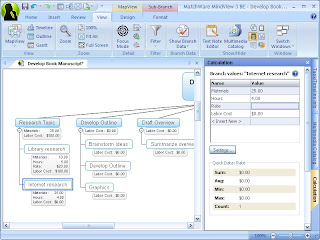
Creating Calculations in MindView 3 a Simulation

For the past 2 1/2 years I have worked with Adobe Captivate to create video demonstrations and simulations of software that I am teaching to my students and business clients. I have worked hard to hone my skills and last Fall passed the Adobe Certification test for Adobe Captivate 3. When Adobe Captivate 4 was released I was eager to get my hands on it and learn about how to integrate some of the new features into my elearning bag of tricks. One of the areas that Adobe Captivate 4 really shines in the development of software simulations. It is possible with Adobe Captivate 4 to create simulations that your users can interact with that allows them to experience what it is like to use a specific piece of software without actually having to have the software installed on their computer. Imagine being able to guide someone through a software application with prompts and feedback. What makes Adobe Captivate 4 even nicer is that for the most part it builds most of the simulation for you right out of the box. With the addition of the editing tools in Adobe Captivate you can always go back to your screens and edit them.

This past weekend I had a chance to build a simulation of what it would be like to utilize the Calculation features that are built into MindView 3 Business Edition. The Calculation feature found in MindView 3 BE is very powerful but may not be as accessible for some who may not understand how to use it. Using the Calculation feature you can add numerical values to branches as well as formulas that are automatically calculated. Built-in functions allow you to display values automatically rolled up from lower sub-branches to higher ones. This is extremely powerful but I would guess that many MindView 3 users have not attempted to use this feature because of the step involved. In any case I am hoping that if you walk through my video simulation you will have a good idea of how to add numerical values and create formulas to your branches and then using the built in functions Sum the values. So give it a try and let me know what you liked or disliked about working through the simulation.

15 More Workplace eLearning Blogs

Based on my post Top 99 Workplace eLearning Blogs several people contacted me with suggestions for additional blogs to include in eLearning Learning.  So, I'm happy to say that eLearning Learning now includes the 15 following great sources in addition to the 99 previously listed:

Several of these came courtesy of Mainsh's list - Blogs by Indian Learning Professionals and Companies.  Thanks for helping Manish.

I'm excited to have all of these new sources as part of eLearning Learning.  It helps me find great stuff and especially to make sure that I don't miss good stuff.  With the Best Of feature, I know that I'll see what's coming up as the good stuff each week and month.  For example, yesterday I posted the Best Of August 2009:

LMS – LCMS – Camtasia – Best of eLearning Learning – August 2009

It included several great posts that I had missed during the month.

Tuesday, September 8, 2009

Speaking at the DevLearn 2009 Conference

I am really excited to have my presentation accepted this year at the DevLearn 2009 Conference which will be held in San Jose, CA from November 10-13, 2009. This is a great opportunity for me to share how I have been using eLearning in the work that I do teaching graduate courses in educational and assistive technology. I will be speaking on the topic of: Delivering e-Learning Assets in PDF Format. It is also an opportunity for me to meet some of the renowned leaders in the field of eLearing and learn the latest from some of the best in the field. While I'm out in San Jose, I will also have a chance to spend Monday at the Adobe Learning Summit 2009, an all day conference focusing on learning more about the Adobe products and how to best use them to put together innovative eLearning materials.

Here is a synopsis of my presentation for the DevLearn 2009 Conference:

Using the ubiquitous PDF format, it is now easier than ever to deliver your digital assets for your students to view with the free Adobe Acrobat Reader 9. Today you can also take advantage of screencasting software (Adobe Captivate and Camatasia Studio) that can be integrated into a PDF Portfolio. These technologies now let you incorporate rich media into your courses, and deliver them as a PDF.

In this session, participants will learn how to create PDF Portfolios that can contain Word documents, graphics, Excel spreadsheets, and video, and deliver your final document in one PDF file. You will learn how to use Adobe Acrobat Extended Pro with Adobe Presenter to create e Learning materials from your PowerPoint slides that you can publish as a PDF. You will also view a recently completed eBook project called Technology Support for Writing that incorporates SWF videos.

In this session, you will learn:
  • How to create a PDF Portfolio using a variety of file formats

  • How to create e-Learning materials from your PowerPoint slides using Adobe Presenter

  • How to integrate SWF videos from Camtasia Studio and Adobe Captivate into your PDF Portfolios

  • How to deliver your PDF Portfolio with the free Adobe Acrobat Reader

  • How to add SWF videos to Microsoft Word and PowerPoint
If you you are interested in eLearning this is one conference you will not want to miss. Hope to see you there.