Monday, September 14, 2009

eLearning Strategy

I spend a fair amount of my consulting time working with large organizations to help define how they will apply technology to particular business / performance / learning needs. This is either in terms of specific needs, e.g., improve customer satisfaction, or as part of an overall eLearning strategy.

I've spent several hours this morning trying to find good resources on eLearning Strategy development and particularly looking for examples to use in this post. I've really been striking out. I'm hoping that people will help out.

Update Nov. 2010 - I just did a search for eLearning Strategy articles and through eLearning Learning found a bunch more around eLearning Strategies, Learning Strategies that resulted in Top 35 Articles on eLearning Strategy.

Most of the time I'm working with a centralized technology groups within Learning and Development that acts as a services arm to corporate L&D and to distributed L&D that is spread throughout the organization. I wish I had a good name for these groups, but they are called something different in most organizations. For the purpose of this post, I'll call it the L&D Technology Group.

It's interesting working closely with L&D Technology Groups because you are a key influencer, but you don't really decide much about the performance and learning strategies. Rather, you are very similar to a services company. You get requests for help building particular kinds of solutions. You determine business requirements around that solution and get to influence where it goes. But ultimately, the internal customer and likely someone who is in another department within L&D who is responsible for learning design (ID) ultimately decides on the approach that will be taken.

Another interesting aspect for the L&D Technology Group is that you really don't know what your next client may ask you to do. So, you have to be prepared for a wide variety of different kinds of requirements and be ready to service them. You can't afford to be constantly saying, "We can't help you with that." At the same time, you can't over-engineer because it costs too much to prepare for every last contingency.

This is the heart of the challenge in defining eLearning Strategy:

  • predicting future needs,
  • planning to effectively and efficiently service those needs.

Predicting Needs

The starting point for an eLearning Strategy is predicting needs. This is very hard. Clearly, you are going to go around the organization to various business owners, partners such as IT, KM, Corporate Library, etc., and to your distributed L&D organization to understand what you can about the kinds of requirements they will have in the future. Of course, you can't say - "What requirements will you have for me in the future?" Few of your internal customers or partners will be able to answer that question in a way that really helps you.

Instead, the eLearning Strategy discussion is a learning, teaching and evangelist discussion. You start the conversation by understanding what their real business, performance, talent and learning challenges are. And then you shift from those challenges to the myriad of different kinds of solutions that might be part of solutions. You have to walk people through different tools and learning methods. Show potential customers within the organization what they are and how they can be applied. Then collaborate around where and how they might fit with the organizations needs.

This conversations can result in some really great outcomes. But most often, it's quite a mess. You will hear about many different kinds of possible future needs. Some wish list kinds of things. Often you have to talk your internal customer out of something that's pretty crazy. "Sure that 3D telepresence stuff if pretty cool. I bet we could get similar outcomes by using X. It wouldn't be quite as cool, but is probably much more cost effective."

Still in my experience this is messy stuff and you try your best to capture what it means for you in terms of requirements.

I would love to hear how people do this and if they have good ways of capturing this mess of requirements.

Planning Services

From this messy set of requirements, you are really looking at a strategy where you define the set of services you will deliver to the rest of the organization. This includes:

  • Learning Method Support
  • Tools / Technologies
  • Process / People / Vendors

You need to be the one who is aware of what's happening generally with technology in the organization. You have to be a really good partner with IT. You are going to be learning's liaison to IT.

You likely are also a liaison to vendors. As parts of the organization have variable needs for technology solutions, part of the strategy is to be able to quickly and effectively engage with vendors to address particular needs.

Technology steward – you likely can't say to the rest of the organization, "Don't use these tools." But you can say, "We know this set of tools works. If you use this other tool, we won't be able to support you as well."

Packaging Your eLearning Strategy

In most cases, if you are going after significant dollars, a key aspect of your eLearning Strategy will be how you present it. Most often this includes some kind of vision for what you are looking to provide. It will summarize at a high level the requirements you are hearing and then will talk about what this means in terms of your Learning Strategies and then how the technologies fit into this.

Most of the time, it's best not to focus too much on all the different individual types of solutions you are prepared to deliver, but rather on the net effects. Still almost every eLearning Strategy will contain something like the Learning Methods from Reuters:

reuters-learning-methods

This is broader than the technology group, but there are implications for the technology group. You can also see that there are talent elements in this list.

It will also contain a list of major technology or related initiatives along a timeline:

image

I did a bit of searching looking for examples of corporate/workplace eLearning Strategy presentation decks. I didn't find a lot. It would be really interesting to see what people produce around these things. Please point me to them!

Bigger eLearning Strategy Questions

Focus?

  • See Learning Performance Business Talent Focus. This question of focus and scope has a major impact on the strategy.
  • What's your role relative to Talent Strategies? Are you involved in Selection, Onboarding, Reviews, Development?
  • What's your role relative to providing business and performance focused initiatives? Are you on the front lines of improving customer satisfaction? Do you get in and analyze aspects of performance relative to that and provide Data Driven performance solutions? Or are you going to be brought in to provide training?

Informal learning?

  • Are you focused on and responsible for informal learning solutions? What responsibility do you have after the learning event?
  • Providing a set of tools (wikis, blogs, discussion groups, etc.) that can be used as part of informal learning support does not mean that you are really supporting informal learning in the organization. There's a lot more to it than that. And part of your strategy should be to be prepared to help your internal customers with those aspects.

Others

  • Off-the-Shelf / External Content?What's your responsibility for finding, vetting, facilitating the acquisition of external content sources, e.g., Skillsoft, Books 24x7, Safari, etc.
  • Content management, re-use
  • Portal and portal integration
  • Reporting/dashboards

What are some of the other big eLearning Strategy questions?

Resources

Bersin provides a great high-level list of issues to consider in their Modernize Corporate Training: The Enterprise Learning Framework. It is good to raise possible areas to consider.

bersin-framework-detailed

Also worth a peek is: The eLearning Guild : Guild eBooks: Handbook of e-Learning Strategy

What other resources are there on this topic? What would help me think through what I might be missing in my strategy? What would help me create a presentation to executives with our eLearning Strategy?

Friday, September 11, 2009

Clickfree’s Transformer for iPod Saves the Day!


Some time in August, I decided to upgrade my MacBook to OS X 10.5 and while everything went smoothly, when I was done my iTunes Library was wiped clean. My wife and I have been using the MacBook to synch with her new Nano and I couldn't believe that all of the songs were gone- now all I was thinking about was the hours of work ripping CD's and getting her iTunes Library back in order. But late last week I had received Clickfree’s Transformer for iPod. The Clickfree’s Transformer for iPod is a unique device that allows you to back-up your files from your computer to the unused portion of your iPod or iPhone. While I thought this was a good idea-I also learned that it could transfer your music from your iPod and import them into your iTunes Library. To say the least, I was more excited with the thought of being able to move my music files from the iPod to my iTunes Library then in the back-up feature.

In any case if this worked as planned, I would be back in action and have my iTunes Library back to where it was before I upgraded the operating system. So I plugged the Clickfree’s Transformer for iPod into my computer and plugged my iPod Nano into the Transformer and clicked on the Import button. Within seconds the transfer of my music files was moving ahead as planned. It took some time to download the 300 or so songs and once it was done it transferred the songs back into my iTunes Library. I couldn't believe just how easy it was to do. Once I had resurrected my iTunes Library I then initiated a back up of my files on my Macintosh which worked very well. Clickfree automatically can back up your videos, music, and document files effortlessly with no software to install. It supports multiple computers as well as supporting Windows, and Mac. This is a unique product with some outstanding features. In my case the Clickfree’s Transformer for iPod was a life safer helping me to resurrect my iTunes Libarary. I would highly recommend this produc- it worked as advertised and exceeded my expectations. For more information about Clickfree’s Transformer for iPod click here.

Thursday, September 10, 2009

Webspiration Updated!

I have been a big fan of Webspiration and it is always exciting for me to hear about the latest changes and updates to the application. Here is a recent email that I received about some new features which I'm sure you will want to try out.

The newest Webspiration updates include the ability to easily create personal templates, to distribute copies of documents to other Webspiration users and to set up collaboration groups.

Personal Templates

Now you can create your own personal templates. This is especially useful for documents you use on a regular basis, such as weekly project notes or monthly reports. Learn more.


Distribute copies of your documents to other users

The Distribute copies option allows you to provide other users with their own copy of an existing document. This is especially useful if you have created a document as a starter for a group, but you want each individual in that group to be responsible for completing the work. Learn more.

Collaboration Groups

Creating Collaboration Groups makes inviting users with whom you regularly collaborate fast and easy. Once a group is set up, you can invite all of its members at once to view or collaborate on a document. Learn more.


Check out the newly redesigned myWebspiration.com website!

In addition to updating our look, we have added several tools to help you use Webspiration to think visually and get organized:
  • Visit our new Examples Gallery to find and share Webspiration examples with your peers
  • Browse our Tips & Tricks section to find ideas that will help you focus your projects and jumpstart your work
  • Or, find answers to your questions in our newly redesigned Help Center.

We are always looking for your feedback. Please send us an email with suggestions of what you'd like to see.

Thank you for your continued support and use of Webspiration,
The Webspiration Team

eLearning Costs

A reader sent a note asking my opinion on the vendor pricing in The Great eTrain Robbery? (Please Opine). Here's his brief description:

The particular course in question is approximately 2 hours of classroom soft skills training that needs to be delivered in an eLearning format. The content has already been written for the classroom. It needs to be repurposed for eLearning. The course will be developed using a Lectora-style system that produces what is essentially an HTML/javascript page turner. Multimedia (animation, narration, etc.) will be minimal. The course will not be narrated in its entirety, but there may be some snippets of narration here and there. Interactions should be basic form-based questions created within the development application. Graphics will include basic stock images/clip art in the classic “eLearning that looks like a bad PowerPoint presentation” style.

The fixed-price contract that has been signed with the vendor for this course is for 766 hours of development at an average hourly rate of $116 for a total of $89,000+.

His question is whether this price is reasonable, high or worth raising a stink.

From his brief description, the price sounds high, but I would need to know a bit more detail to be sure. For example, how much rewrite of the original course will be done. Are you coming up with "simulations" or more complex exercises to teach the soft skills? In many cases, there can be significant work to design that kind of learning experience.

If it's merely a port without significant redesign, then that's a pretty high price.

If you are going to raise a stink, I would suggest you do it by pointing to various resources that discuss costs. I went to my favorite resource (eLearning Learning) and looked at the keywords: Cost and Ratio and found some pretty good sources:

When you look at these, you will come up with various ratios and costs. The one from Karl Kapp in Learning Circuits (Time to Develop One Hour of Training) would seem good to cite.

Take a look and the ratios range from 122 to 243 hours per finished hour for simple courses. This aligns with Bryan Chapman's 220:1 ratio. However, before you jump all over the 383 per finished hour that the vendor is citing, note that Kapp includes Soft Skills Simulations that ranges from 320 to 731 per finished hour.

So, again, a big question is whether they are designing a kind of simulation that plays within the simple interactions you describe?

Mind Mapping Updates for Snow Leopard OS X 10.6


For those of you who have upgraded to the latest Mac OS- Snow Leopard you may have encountered some difficulties running your existing applications. While the software companies are well informed about these impending changes that may impact on their software sometimes it is hard to get the patches out the door exactly when the new operating system ships. You will be happy to know that Mindjet has recently released an update for MindManager 7 which will now allow you to run MindManager for the Mac under Apple's latest operating system called Snow Leopard. You can download the update by clicking here.

Likewise, I just received word from CS Odessa that announced that all of the current versions of their ConceptDraw productivity software product line now fully supports the Apple Macintosh OS X 10.6, Snow Leopard operating system. You can find the ConceptDraw Office Update by clicking here. So if you are using ConceptDraw MindMap with Snow Leaopard just click on the link and you will be mind mapping in seconds on your Mac with the latest and greatest operating system.

Wednesday, September 9, 2009

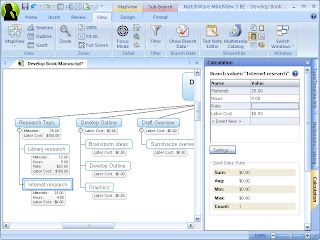
Creating Calculations in MindView 3 a Simulation

For the past 2 1/2 years I have worked with Adobe Captivate to create video demonstrations and simulations of software that I am teaching to my students and business clients. I have worked hard to hone my skills and last Fall passed the Adobe Certification test for Adobe Captivate 3. When Adobe Captivate 4 was released I was eager to get my hands on it and learn about how to integrate some of the new features into my elearning bag of tricks. One of the areas that Adobe Captivate 4 really shines in the development of software simulations. It is possible with Adobe Captivate 4 to create simulations that your users can interact with that allows them to experience what it is like to use a specific piece of software without actually having to have the software installed on their computer. Imagine being able to guide someone through a software application with prompts and feedback. What makes Adobe Captivate 4 even nicer is that for the most part it builds most of the simulation for you right out of the box. With the addition of the editing tools in Adobe Captivate you can always go back to your screens and edit them.

This past weekend I had a chance to build a simulation of what it would be like to utilize the Calculation features that are built into MindView 3 Business Edition. The Calculation feature found in MindView 3 BE is very powerful but may not be as accessible for some who may not understand how to use it. Using the Calculation feature you can add numerical values to branches as well as formulas that are automatically calculated. Built-in functions allow you to display values automatically rolled up from lower sub-branches to higher ones. This is extremely powerful but I would guess that many MindView 3 users have not attempted to use this feature because of the step involved. In any case I am hoping that if you walk through my video simulation you will have a good idea of how to add numerical values and create formulas to your branches and then using the built in functions Sum the values. So give it a try and let me know what you liked or disliked about working through the simulation.

15 More Workplace eLearning Blogs

Based on my post Top 99 Workplace eLearning Blogs several people contacted me with suggestions for additional blogs to include in eLearning Learning.  So, I'm happy to say that eLearning Learning now includes the 15 following great sources in addition to the 99 previously listed:

Several of these came courtesy of Mainsh's list - Blogs by Indian Learning Professionals and Companies.  Thanks for helping Manish.

I'm excited to have all of these new sources as part of eLearning Learning.  It helps me find great stuff and especially to make sure that I don't miss good stuff.  With the Best Of feature, I know that I'll see what's coming up as the good stuff each week and month.  For example, yesterday I posted the Best Of August 2009:

LMS – LCMS – Camtasia – Best of eLearning Learning – August 2009

It included several great posts that I had missed during the month.